Mega Man 8-Bit Deathmatch Forum
OffsetIt - Make that HUD smooth
PinkRoboBlaster • April. 4, 2026, 8:30 PM
&knuckles
April. 4, 2026, 8:39 PM (Edited by PinkRoboBlaster)
Copy Link
Have you ever wanted to give your weapon some extra flair? Maybe you want to extend your 3 frame animation to include some extra movement?
Well you could just manually offset each frame in-editor but that can be pretty time consuming just for some minor movement.
Or you could use to use the offset() function to move the weapon mid-game! But using that for anything that isn't just basic up and down motions normally leads to a bunch of guess work, leaving its potential inaccessible to the normal MegaMan... Well don't worry because I got equipped with this
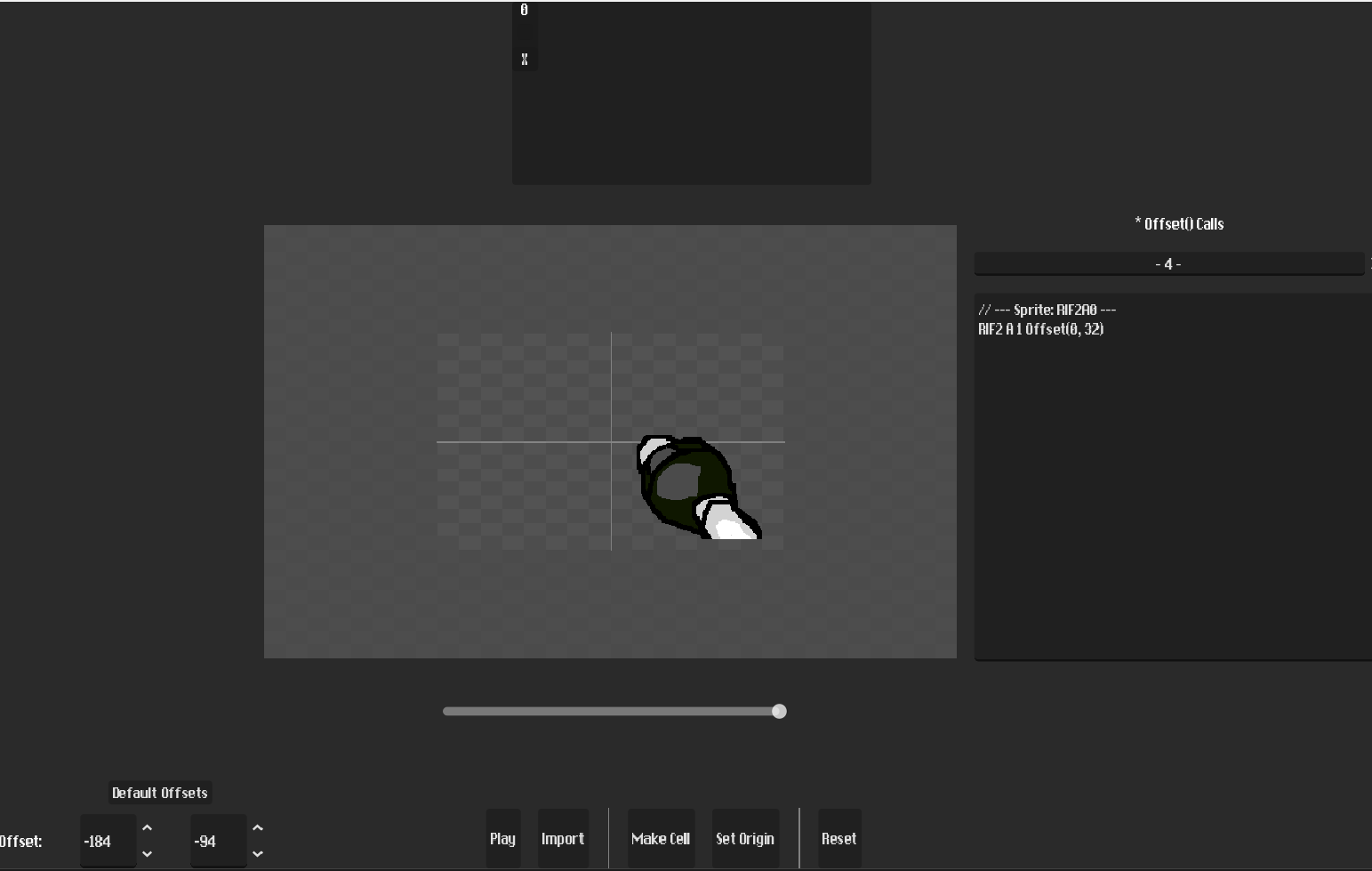
This is OffsetIt() (also known as "become ecl1p5e device"). This tool gives you a user interface which allows for you to simply click and drag to automatically generate lines of offset() code - kinda like a basic animation tool!
Make Cells yourself - or use the Set Origin button and Click and Drag! Its that simple! You can even play out the sequence you created in editor!
Features:
Simple UI: The editor is designed after the SLADE3 graphics editor so its pretty simple
EZ Usage: Just click and drag bro
grAb Support: Sprites that were previously imported into SLADE3 keep their default offsets - pretty neat
How to use
Step 1: Export your SLADE3 hud images into the _assets folder
Step 2: Import the images from the _assets folder into the editor
Step 3: Ur done, click drag or smth idk
you can find the tool here!!!!
can be a bit buggy at times so make sure to report that - you can see it in action while playing this mod
Well you could just manually offset each frame in-editor but that can be pretty time consuming just for some minor movement.
Or you could use to use the offset() function to move the weapon mid-game! But using that for anything that isn't just basic up and down motions normally leads to a bunch of guess work, leaving its potential inaccessible to the normal MegaMan... Well don't worry because I got equipped with this
This is OffsetIt() (also known as "become ecl1p5e device"). This tool gives you a user interface which allows for you to simply click and drag to automatically generate lines of offset() code - kinda like a basic animation tool!
Make Cells yourself - or use the Set Origin button and Click and Drag! Its that simple! You can even play out the sequence you created in editor!
Features:
Simple UI: The editor is designed after the SLADE3 graphics editor so its pretty simple
EZ Usage: Just click and drag bro
grAb Support: Sprites that were previously imported into SLADE3 keep their default offsets - pretty neat
How to use
Step 1: Export your SLADE3 hud images into the _assets folder
Step 2: Import the images from the _assets folder into the editor
Step 3: Ur done, click drag or smth idk
you can find the tool here!!!!
can be a bit buggy at times so make sure to report that - you can see it in action while playing this mod